> ## Documentation Index
> Fetch the complete documentation index at: https://docs.prefect.io/llms.txt
> Use this file to discover all available pages before exploring further.
# Define event triggers
> Define a custom trigger to react to many kinds of events and metrics.
export const events = {
cli: "https://docs.prefect.io/v3/api-ref/cli/event",
api: "https://app.prefect.cloud/api/docs#tag/Events",
tf: "https://registry.terraform.io/providers/PrefectHQ/prefect/latest/docs/resources/automation"
};
export const API = ({name, href}) => You can manage {name} with the Prefect API .
;
export const TF = ({name, href}) => You can manage {name} with the Terraform provider for Prefect .
;
When you need a trigger beyond what the templates in the UI trigger builder provide, you can define a custom trigger in JSON. With custom triggers, you have access to the full capabilities of Prefect's automation system—allowing you to react to many kinds of events and metrics in your workspace.
Each automation has a single trigger that, when fired, causes all of its associated actions to run. That single
trigger may be a reactive or proactive event trigger, a trigger monitoring the value of a metric, or a composite trigger
that combines several underlying triggers.
:`. This will use the value of that label for the first related resource in that role. |
| **threshold** | integer | N/A | The number of events required for this Automation to trigger (for Reactive automations), or the number of events expected (for Proactive automations) |
| **within** | number | N/A | The time period over which the events must occur. For Reactive triggers, this may be as low as 0 seconds, but must be at least 10 seconds for Proactive triggers. |
### Resource matching
Both the `event` and `metric` triggers support matching events for specific resources in your workspace, including most
Prefect objects (like flows, deployment, blocks, work pools, tags) as well as resources you have defined in any
events you emit yourself.
The `match` and `match_related` fields control which events a trigger considers for evaluation
by filtering on the contents of their `resource` and `related` fields, respectively. Each label added to a `match` filter
is `AND`ed with the other labels, and can accept a single value or a list of multiple values that are `OR`ed together.
#### Example
See the `resource` and `related` fields on the following `prefect.flow-run.Completed` event, truncated for this example.
Its primary resource is a flow run, and since that flow run was started by a deployment, it is related to both its flow and its deployment:
```json theme={null}
"resource": {
"prefect.resource.id": "prefect.flow-run.925eacce-7fe5-4753-8f02-77f1511543db",
"prefect.resource.name": "cute-kittiwake"
},
"related": [
{
"prefect.resource.id": "prefect.flow.cb6126db-d528-402f-b439-96637187a8ca",
"prefect.resource.role": "flow",
"prefect.resource.name": "hello"
},
{
"prefect.resource.id": "prefect.deployment.37ca4a08-e2d9-4628-a310-cc15a323378e",
"prefect.resource.role": "deployment",
"prefect.resource.name": "example"
},
{
"prefect.resource.id": "prefect.work-pool.a67da06b-9427-4a0f-a709-c3b37ac29cbf",
"prefect.resource.role": "work-pool",
"prefect.resource.name": "k8s-pool",
"prefect.work-pool.type": "kubernetes"
},
{
"prefect.resource.id": "prefect.tag.examples",
"prefect.resource.role": "tag"
}
]
```
There are a number of valid ways to select the above event for evaluation, and the approach depends on the purpose of
the automation.
The following configuration filters for any events whose primary resource is a flow run, *and* that flow run has a
name starting with `cute-` or `radical-`.
```json theme={null}
"match": {
"prefect.resource.id": "prefect.flow-run.*",
"prefect.resource.name": ["cute-*", "radical-*"]
},
"match_related": {},
...
```
By comparison, this configuration filters for any events this specific deployment is a related
resource to:
```json theme={null}
"match": {},
"match_related": {
"prefect.resource.id": "prefect.deployment.37ca4a08-e2d9-4628-a310-cc15a323378e"
},
...
```
Both of the above approaches will select the example `prefect.flow-run.Completed` event, but will permit additional,
possibly undesired events through the filter as well. You can combine `match` and `match_related` for more restrictive
filtering:
```json theme={null}
"match": {
"prefect.resource.id": "prefect.flow-run.*",
"prefect.resource.name": ["cute-*", "radical-*"]
},
"match_related": {
"prefect.resource.id": "prefect.deployment.37ca4a08-e2d9-4628-a310-cc15a323378e"
},
...
```
Now this trigger will filter only for events whose primary resource is a flow run started by a specific deployment,
*and* that flow run has a name starting with `cute-` or `radical-`.
##### Advanced matching for related resources
`match_related` also supports an array of objects, each of which can contain multiple labels.
This allows for more complex matching on related resources, such as filtering for events that are related to a specific work pool or tag.
When `match_related` is a list of objects, each object must match independently (AND logic across items).
Within a single object, list values for a label are OR'd together.
For example, `[{"prefect.resource.role": "tag", "prefect.resource.id": "prefect.tag.bronze"}, {"prefect.resource.role": "tag", "prefect.resource.id": "prefect.tag.prod"}]`
requires that the event is related to **both** the `bronze` tag **and** the `prod` tag.
To match flow runs on a work pool with specific tags, you can use the following configuration:
```json theme={null}
"match": {
"prefect.resource.id": "prefect.flow-run.*"
},
"match_related": [
{
"prefect.resource.name": "k8s-pool",
"prefect.resource.role": "work-pool"
},
{
"prefect.resource.id": "prefect.tag.examples",
"prefect.resource.role": "tag"
}
]
...
```
The same configuration in Python using `DeploymentEventTrigger`:
```python theme={null}
from prefect.events import DeploymentEventTrigger, Posture
DeploymentEventTrigger(
posture=Posture.Reactive,
expect={"prefect.flow-run.Completed"},
match={"prefect.resource.id": "prefect.flow-run.*"},
match_related=[
{
"prefect.resource.name": "k8s-pool",
"prefect.resource.role": "work-pool",
},
{
"prefect.resource.id": "prefect.tag.examples",
"prefect.resource.role": "tag",
},
],
)
```
##### Negative matching
Use the `!` prefix to exclude resources with specific label values. A negative pattern matches
any value that does *not* match the rest of the pattern.
Two rules govern how negative patterns interact with the rest of a filter:
* **Values in a list are `OR`ed together**, so a negative pattern cannot be combined with a
positive pattern in the same list. In `["dev-*", "!dev-automations"]`, any name matching
`dev-*` satisfies the first pattern and the negative pattern is never applied. To scope with a
wildcard *and* exclude a value, use a list of `match_related` objects (see below).
* **A `match_related` object matches when any single related resource satisfies all of its
labels.** Exclusions are therefore only reliable for roles where an event has exactly one
related resource, such as `work-pool` or `deployment`. For roles with many resources per
event, such as `tag`, `{"prefect.resource.id": "!prefect.tag.dev", "prefect.resource.role":
"tag"}` matches any event with at least one tag *other than* `dev` — it does not exclude
events that carry the `dev` tag alongside other tags.
For example, to match flow runs on any work pool except `dev-automations-work-pool`:
```json theme={null}
"match": {
"prefect.resource.id": "prefect.flow-run.*"
},
"match_related": {
"prefect.resource.name": "!dev-automations-work-pool",
"prefect.resource.role": "work-pool"
}
```
To narrow that to only the `dev-*` work pools while still excluding that one, use two
`match_related` objects — each object must match independently:
```json theme={null}
"match": {
"prefect.resource.id": "prefect.flow-run.*"
},
"match_related": [
{
"prefect.resource.name": "dev-*",
"prefect.resource.role": "work-pool"
},
{
"prefect.resource.name": "!dev-automations-work-pool",
"prefect.resource.role": "work-pool"
}
]
```
This configuration matches flow runs on any work pool whose name starts with `dev-`, except
`dev-automations-work-pool`. This pattern is especially useful when an automation starts flow
runs of its own: excluding the work pool those runs execute on prevents the automation from
triggering on itself.
### Expected events
Once an event has passed through the `match` filters, you must decide if this event counts toward the
trigger's `threshold`. That is determined by the event names present in `expect`.
This configuration informs the trigger to evaluate *only* `prefect.flow-run.Completed` events that have passed the
`match` filters.
```json theme={null}
"expect": [
"prefect.flow-run.Completed"
],
...
```
`threshold` decides the quantity of `expect`ed events needed to satisfy the trigger. Increasing the `threshold`
above 1 requires use of `within` to define a range of time when multiple events are seen. The following
configuration expects two occurrences of `prefect.flow-run.Completed` within 60 seconds:
```json theme={null}
"expect": [
"prefect.flow-run.Completed"
],
"threshold": 2,
"within": 60,
...
```
Use `after` to handle scenarios that require more complex event reactivity.
For example, this flow emits an event indicating the table it operates on is missing or empty:
```python theme={null}
from prefect import flow
from prefect.events import emit_event
from myproject.db import Table
@flow
def transform(table_name: str):
table = Table(table_name)
if not table.exists():
emit_event(
event="table-missing",
resource={"prefect.resource.id": "etl-events.transform"}
)
elif table.is_empty():
emit_event(
event="table-empty",
resource={"prefect.resource.id": "etl-events.transform"}
)
else:
# transform data
...
```
The following configuration uses `after` to prevent this automation from firing unless either a `table-missing` or a
`table-empty` event has occurred before a flow run of this deployment completes.
Note how `match` and `match_related` ensure the trigger only evaluates events that are relevant to its
purpose.
```json theme={null}
"match": {
"prefect.resource.id": [
"prefect.flow-run.*",
"etl-events.transform"
]
},
"match_related": {
"prefect.resource.id": "prefect.deployment.37ca4a08-e2d9-4628-a310-cc15a323378e"
},
"after": [
"table-missing",
"table-empty"
],
"expect": [
"prefect.flow-run.Completed"
],
...
```
### Evaluation strategy
All of the previous examples were designed around a reactive `posture`; that is, count up events toward the
`threshold` until it is met, then execute actions. To respond to the absence of events, use a proactive `posture`.
A proactive trigger fires when its `threshold` has *not* been met by the end of the window of time defined by `within`.
Proactive triggers must have a `within` value of at least 10 seconds.
The following trigger fires if a `prefect.flow-run.Completed` event is not seen within 60 seconds after a
`prefect.flow-run.Running` event is seen:
```json theme={null}
{
"match": {
"prefect.resource.id": "prefect.flow-run.*"
},
"match_related": {},
"after": [
"prefect.flow-run.Running"
],
"expect": [
"prefect.flow-run.Completed"
],
"for_each": [],
"posture": "Proactive",
"threshold": 1,
"within": 60
}
```
However, without `for_each`, a `prefect.flow-run.Completed` event from a *different* flow run than the one that
started this trigger with its `prefect.flow-run.Running` event could satisfy the condition. Adding a `for_each` of
`prefect.resource.id` causes this trigger to be evaluated separately for each flow run id associated with these events.
```json theme={null}
{
"match": {
"prefect.resource.id": "prefect.flow-run.*"
},
"match_related": {},
"after": [
"prefect.flow-run.Running"
],
"expect": [
"prefect.flow-run.Completed"
],
"for_each": [
"prefect.resource.id"
],
"posture": "Proactive",
"threshold": 1,
"within": 60
}
```
### Event ordering and `after`
A trigger with an `after` clause starts watching for its `expect` events only once one of
its `after` events has arrived. An `expect` event that arrives at the system before the
trigger's `after` event does not count, even when the two events were emitted in the
correct order. For a Reactive trigger this can mean a missed firing; for a Proactive
trigger it can mean a spurious one.
Prefect does not guarantee the order that unrelated events arrive at the system: events
that occur within a second or two of each other may arrive in either order. When your
code emits the `expect` event immediately after the `after` event—for example, from a
[state change hook](/v3/how-to-guides/workflows/state-change-hooks#emit-events-from-state-change-hooks)
or right after emitting the first event—declare the relationship with
[`follows`](/v3/concepts/events#event-ordering) on the later event.
Triggers hold an event that declares `follows` until the event it follows has arrived, so
the pair is always processed in order and the race disappears. If the followed event
never arrives, the held event is processed on its own after several minutes—a lost
predecessor delays the follower rather than losing it.
Events that are naturally separated by more time—like an `order.created` and an
`order.complete` minutes apart—don't strictly need `follows`, but it can still be good
practice to set it to document the relationship between the events.
### Metric triggers
Metric triggers (`{"type": "metric"}`) fire when the value of a metric in your workspace crosses a threshold you defined.
For example, you can trigger an automation when the success rate of flows in your workspace drops below 95% over the course
of an hour.
Prefect's metrics are all derived by examining your workspace's events, and if applicable, use the `occurred` times of
those events as the basis for their calculations.
Prefect defines three metrics:
* **Successes** (`{"name": "successes"}`), defined as the number of flow runs that went `Pending` and then the latest
state we saw was not a failure (`Failed` or `Crashed`). This metric accounts for retries if the ultimate state was
successful.
* **Duration** (`{"name": "duration"}`), defined as the *length of time* that a flow remains in a `Running` state before
transitioning to a terminal state such as `Completed`, `Failed`, or `Crashed`. Because this time is derived in terms of
flow run state change events, it may be greater than the runtime of your function.
* **Lateness** (`{"name": "lateness"}`), defined as the *length of time* that a `Scheduled` flow remains in a `Late`
state before transitioning to a `Running` and/or `Crashed` state. Only flow runs that the system marks `Late` are included.
This is the schema of a metric trigger:
| Name | Type | Supports trailing wildcards | Description |
| ------------------ | ------------------------- | --------------------------- | -------------------------------------------------------------- |
| **match** | object | ✅ | Labels for resources which this Automation will match. |
| **match\_related** | object OR array of object | ✅ | Labels for related resources which this Automation will match. |
| **metric** | `MetricTriggerQuery` | N/A | The definition of the metric query to run. |
And the `MetricTriggerQuery` query is defined as:
| Name | Type | Description |
| --------------- | ------------------------------------- | ----------------------------------------------------------------------- |
| **name** | string | The name of the Prefect metric to evaluate (see above). |
| **threshold** | number | The threshold the current metric value is compared to. |
| **operator** | string (`"<"`, `"<="`, `">"`, `">="`) | The comparison operator to use to decide if the threshold value is met. |
| **range** | duration in seconds | How far back to evaluate the metric. |
| **firing\_for** | duration in seconds | How long the value must exceed the threshold before this trigger fires. |
For example, to fire when flow runs tagged `production` in your workspace have been failing at a rate of 10% or worse (in other words, a success rate below 90%) over the last hour, sustained for at least five minutes, create this trigger:
```json theme={null}
{
"type": "metric",
"match": {
"prefect.resource.id": "prefect.flow-run.*"
},
"match_related": {
"prefect.resource.id": "prefect.tag.production",
"prefect.resource.role": "tag"
},
"metric": {
"name": "successes",
"threshold": 0.9,
"operator": "<",
"range": 3600,
"firing_for": 300
}
}
```
To detect when the average lateness of your Kubernetes workloads (running on a work pool named `kubernetes`) in the
last day exceeds five minutes late—and that number hasn't gotten better for the last 10 minutes—use a trigger like this:
```json theme={null}
{
"type": "metric",
"match": {
"prefect.resource.id": "prefect.flow-run.*"
},
"match_related": {
"prefect.resource.id": "prefect.work-pool.kubernetes",
"prefect.resource.role": "work-pool"
},
"metric": {
"name": "lateness",
"threshold": 300,
"operator": ">",
"range": 86400,
"firing_for": 600
}
}
```
### Composite triggers
To create a trigger from multiple kinds of events and metrics, use a `compound` or `sequence` trigger.
These higher-order triggers are composed from a set of underlying `event` and `metric` triggers.
For example, if you want to run a deployment only after three different flows in your workspace have written their
results to a remote filesystem, combine them with a 'compound' trigger:
```json theme={null}
{
"type": "compound",
"require": "all",
"within": 3600,
"triggers": [
{
"type": "event",
"posture": "Reactive",
"expect": ["prefect.block.remote-file-system.write_path.called"],
"match_related": {
"prefect.resource.name": "daily-customer-export",
"prefect.resource.role": "flow"
}
},
{
"type": "event",
"posture": "Reactive",
"expect": ["prefect.block.remote-file-system.write_path.called"],
"match_related": {
"prefect.resource.name": "daily-revenue-export",
"prefect.resource.role": "flow"
}
},
{
"type": "event",
"posture": "Reactive",
"expect": ["prefect.block.remote-file-system.write_path.called"],
"match_related": {
"prefect.resource.name": "daily-expenses-export",
"prefect.resource.role": "flow"
}
}
]
}
```
This trigger fires once it sees at least one of each of the underlying event triggers fire within the time
frame specified. Then the trigger resets its state and fires the next time these three events all happen.
The order the events occur doesn't matter, just that all of the events occur within one hour.
If you want a flow run to complete prior to starting to watch for those three events, you can combine the entire
previous trigger as the second part of a sequence of two triggers. Here the outer trigger is a `sequence` trigger,
its first child trigger expects a `Completed` event, and its second child trigger is the compound trigger from the
prior example:
```json theme={null}
{
"type": "sequence",
"within": 7200,
"triggers": [
{
"type": "event",
"posture": "Reactive",
"expect": ["prefect.flow-run.Completed"],
"match_related": {
"prefect.resource.name": "daily-export-initiator",
"prefect.resource.role": "flow"
}
},
{
"type": "compound",
"require": "all",
"within": 3600,
"triggers": [
{
"type": "event",
"posture": "Reactive",
"expect": ["prefect.block.remote-file-system.write_path.called"],
"match_related": {
"prefect.resource.name": "daily-customer-export",
"prefect.resource.role": "flow"
}
},
{
"type": "event",
"posture": "Reactive",
"expect": ["prefect.block.remote-file-system.write_path.called"],
"match_related": {
"prefect.resource.name": "daily-revenue-export",
"prefect.resource.role": "flow"
}
},
{
"type": "event",
"posture": "Reactive",
"expect": ["prefect.block.remote-file-system.write_path.called"],
"match_related": {
"prefect.resource.name": "daily-expenses-export",
"prefect.resource.role": "flow"
}
}
]
}
]
}
```
In this case, the trigger only fires if it sees the `daily-export-initiator` flow complete, and then the three
files written by the other flows.
The `within` parameter for compound and sequence triggers restricts how close in time (in seconds) the child triggers
must fire to satisfy the composite trigger. For example, if the `daily-export-initiator` flow runs, but the other three
flows don't write their result files until three hours later, this trigger won't fire. Placing these time constraints
on the triggers can prevent a misfire if you know that the events will generally happen within a specific timeframe—
and you don't want a stray older event included in the evaluation of the trigger.
If this isn't a concern for you, you may set `within` to `null`, in which case there is no limit to how far apart in
time the child triggers occur. The `within` key itself is required on compound and sequence triggers — leaving it out
entirely is a validation error.
You can compose any type of trigger into higher-order composite triggers, including proactive event triggers and metric
triggers. In the following example, the compound trigger fires if any of the following events occur: a flow run
stuck in `Pending`, a work pool becoming unready, or the average amount of `Late` work in your workspace going over
10 minutes:
```json theme={null}
{
"type": "compound",
"require": "any",
"within": null,
"triggers": [
{
"type": "event",
"posture": "Proactive",
"after": ["prefect.flow-run.Pending"],
"expect": ["prefect.flow-run.Running", "prefect.flow-run.Crashed"],
"for_each": ["prefect.resource.id"],
"match_related": {
"prefect.resource.name": "daily-customer-export",
"prefect.resource.role": "flow"
}
},
{
"type": "event",
"posture": "Reactive",
"expect": ["prefect.work-pool.not-ready"],
"match": {
"prefect.resource.name": "kubernetes-workers"
}
},
{
"type": "metric",
"metric": {
"name": "lateness",
"operator": ">",
"threshold": 600,
"range": 3600,
"firing_for": 300
}
}
]
}
```
For compound triggers, the `require` parameter may be `"any"`, `"all"`, or a number between 1 and the number of child
triggers. In the example above, if you feel that you are receiving too many spurious notifications for issues that
resolve on their own, you can specify `{"require": 2}` to express that any **two** of the triggers must fire in order
for the compound trigger to fire. Sequence triggers, on the other hand, always require all of their child triggers to
fire before they fire.
Compound triggers are defined as:
| Name | Type | Description |
| ------------ | --------------------------- | ----------------------------------------------------------------------- |
| **require** | number, `"any"`, or `"all"` | The number of child triggers that must fire for this trigger to fire |
| **within** | time, in seconds | How close in time the child triggers must fire for this trigger to fire |
| **triggers** | array of other triggers | |
Sequence triggers are defined as:
| Name | Type | Description |
| ------------ | ----------------------- | ----------------------------------------------------------------------- |
| **within** | time, in seconds | How close in time the child triggers must fire for this trigger to fire |
| **triggers** | array of other triggers | |
### Support for event trigger types
| Feature | Prefect Open Source | Prefect Cloud |
| ---------------------------------------- | ------------------- | ------------- |
| Event Triggers | ✅ | ✅ |
| Composite Triggers (Compound & Sequence) | ✅ | ✅ |
| Metric Triggers | ❌ | ✅ |
### Further reading
* [How to create automations](/v3/how-to-guides/automations/creating-automations/)
* [How to create webhooks](/v3/how-to-guides/cloud/create-a-webhook/)
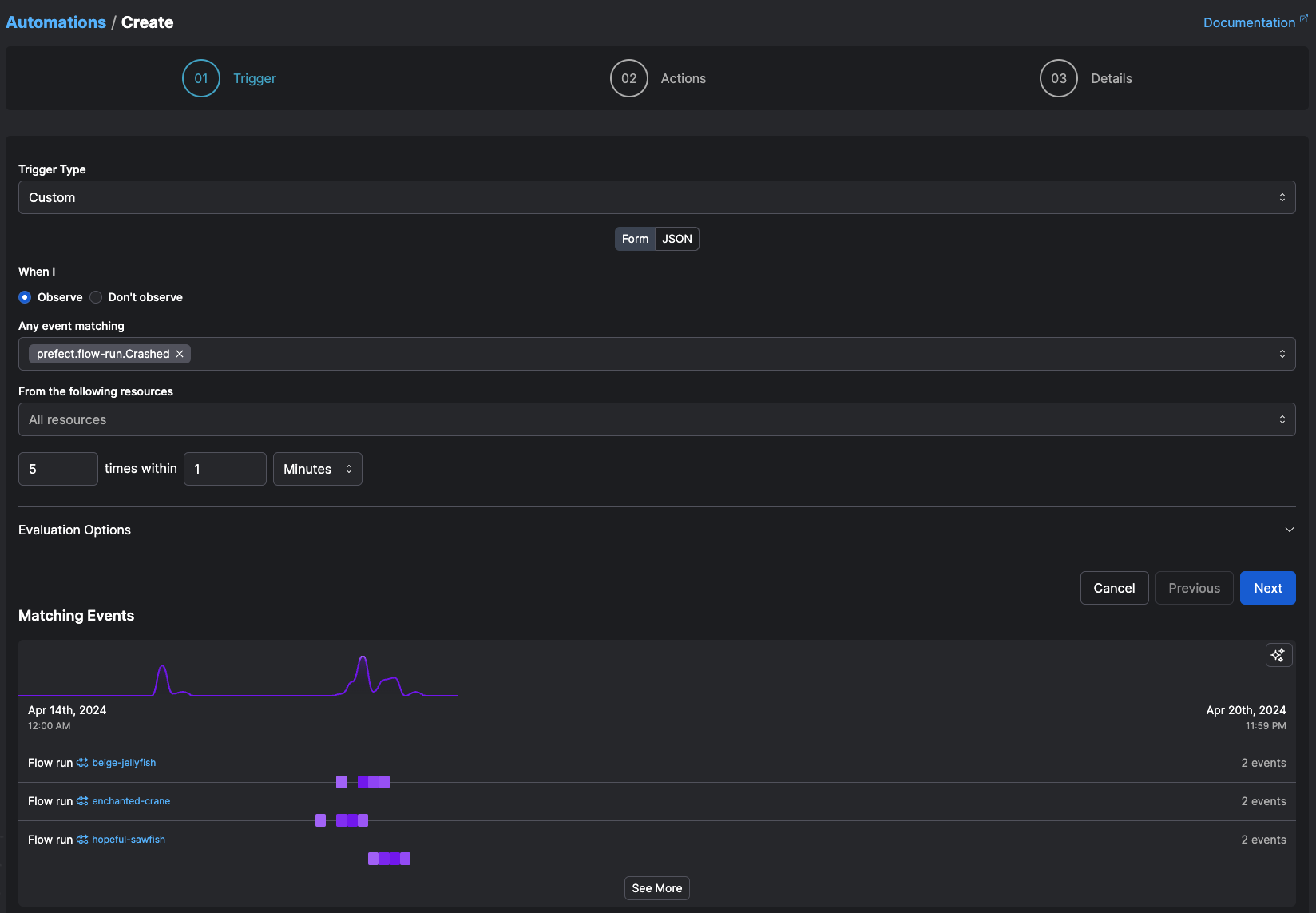 This is the schema that defines an event trigger:
| Name | Type | Supports wildcards and negative matching | Description |
| ------------------ | ------------------------- | ---------------------------------------- | ---------------------------------------------------------------------------------------------------------------------------------------------------------------------------------------------------------------------------------------------------------------------------------------------------------------------------------------------------- |
| **match** | object | ✅ | Labels for resources which this Automation will match. Supports trailing wildcards (`*`) and negative matching (`!`). |
| **match\_related** | object OR array of object | ✅ | Labels for related resources which this Automation will match. Supports trailing wildcards (`*`) and negative matching (`!`). |
| **posture** | string enum | N/A | The posture of this Automation, either Reactive or Proactive. Reactive automations respond to the presence of the expected events, while Proactive automations respond to the absence of those expected events. |
| **after** | array of strings | ✅ | Event(s), one of which must have first been seen to start this automation. |
| **expect** | array of strings | ✅ | The event(s) this automation expects to see. If empty, this automation will evaluate any matched event. |
| **for\_each** | array of strings | ❌ | Evaluate the Automation separately for each distinct value of these labels on the resource. By default, labels refer to the primary resource of the triggering event. You may also refer to labels from related resources by specifying `related:
This is the schema that defines an event trigger:
| Name | Type | Supports wildcards and negative matching | Description |
| ------------------ | ------------------------- | ---------------------------------------- | ---------------------------------------------------------------------------------------------------------------------------------------------------------------------------------------------------------------------------------------------------------------------------------------------------------------------------------------------------- |
| **match** | object | ✅ | Labels for resources which this Automation will match. Supports trailing wildcards (`*`) and negative matching (`!`). |
| **match\_related** | object OR array of object | ✅ | Labels for related resources which this Automation will match. Supports trailing wildcards (`*`) and negative matching (`!`). |
| **posture** | string enum | N/A | The posture of this Automation, either Reactive or Proactive. Reactive automations respond to the presence of the expected events, while Proactive automations respond to the absence of those expected events. |
| **after** | array of strings | ✅ | Event(s), one of which must have first been seen to start this automation. |
| **expect** | array of strings | ✅ | The event(s) this automation expects to see. If empty, this automation will evaluate any matched event. |
| **for\_each** | array of strings | ❌ | Evaluate the Automation separately for each distinct value of these labels on the resource. By default, labels refer to the primary resource of the triggering event. You may also refer to labels from related resources by specifying `related: